
Connecting Meta
Adding Keystone as a partner
Give Keystone's agency account partner access to your Meta business portfolio so we can manage campaigns and pages.
Partner access lets Keystone's agency account work in your ad account, Page, and Instagram profile on your behalf, without anyone sharing a login. You stay the owner and can remove the partner at any time from the same screen.
Keystone's partner business ID is 2147399426024955.
- Go to business.facebook.com, select the business portfolio you connected to Keystone, and open Business Settings.
- Under Users, click Partners. Click + Add at the top right, then Give a partner access to your assets.
- Enter Keystone's partner business ID:
2147399426024955. - Give Keystone full access to everything it lets you select: ad account, Facebook Page, professional Instagram profile, and so on.
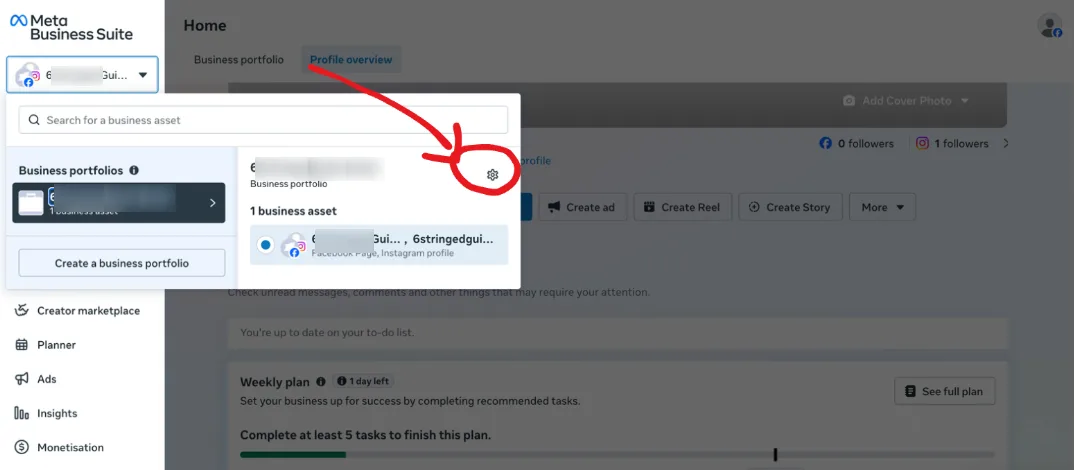
Step 1: the portfolio's Business Settings.
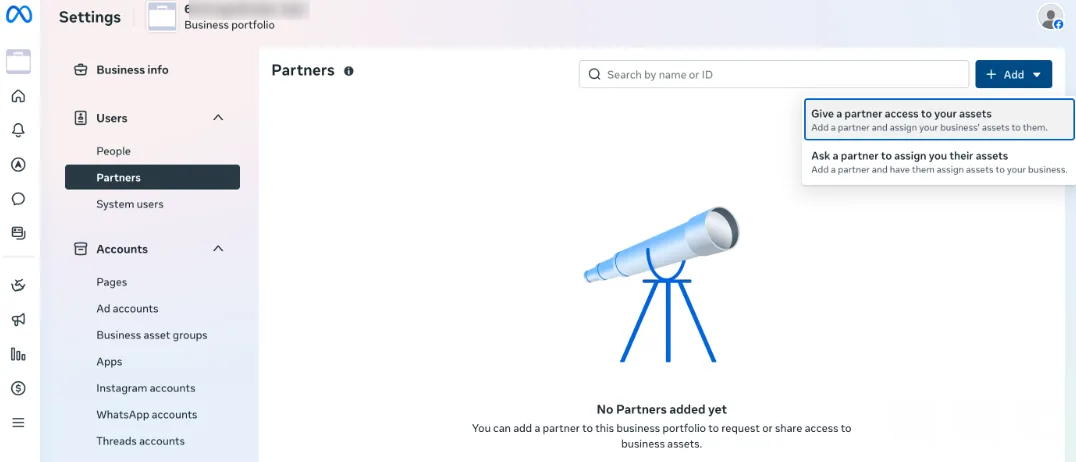
Step 2: Add → Give a partner access to your assets.
Once added, your Growth Partner confirms the access on our side. If an asset is missing from the list Meta offers, it usually means it belongs to a different portfolio; the ad account guide explains how to check which portfolio you are in.