
Settings
Integrations
Connect Facebook, Instagram, Meta Ads, the Meta Conversions API, and Google Business Profile.
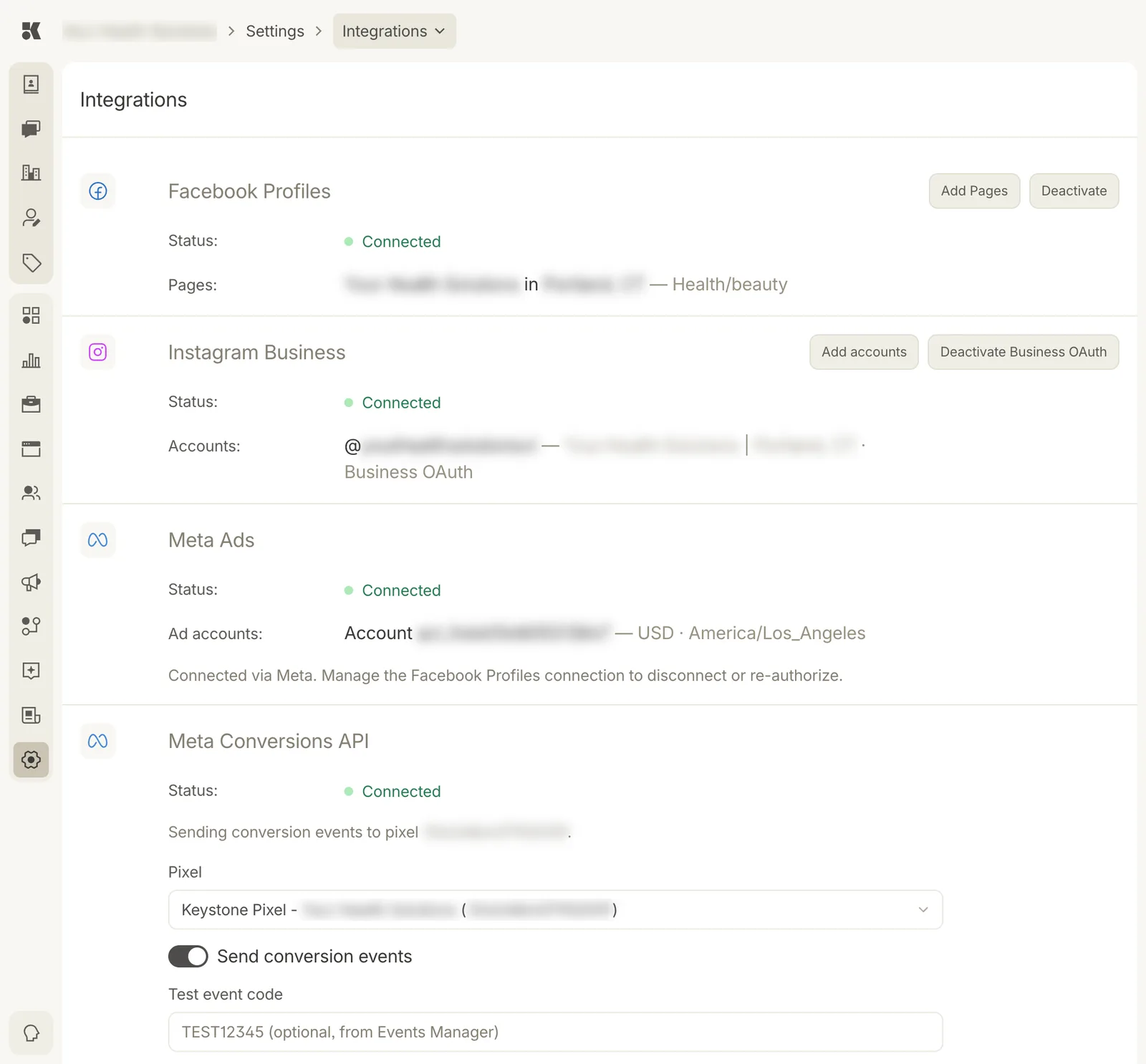
Each block shows its status and what is connected.
Facebook Profiles
Connect your Facebook account and choose the Pages the Social agent may post to. Add Pages adds more; Deactivate disconnects. Pages are listed with their category.
Instagram Business
Instagram Business accounts linked to your Facebook Pages. Connected through Business OAuth; Add accounts picks additional ones.
Meta Ads
Your ad account, with its currency and timezone. Connected through the Facebook connection; to disconnect or re-authorize, manage the Facebook Profiles block. Existing campaigns are imported into Ads.
Meta Conversions API
Sends form submissions, chat starts, and bookings from your website to Meta as conversion events, so campaigns can optimize for leads. Choose the Pixel, leave Send conversion events on, and use Test event code only while checking events in Events Manager. The pixel's state also appears on Website → Status.
Google Business Profile
Further down the page. Connect the Google account that owns your listing, then match each listing to a location in Listings. Enables Maps analytics, review replies, hours sync, and Google posts.